If you are a new blogger or running a WordPress website and struggling to get Google AdSense approval, don’t worry—you are not alone. Many beginners face the same challenge. But here’s the good news: you still have a powerful alternative to monetize your traffic—Adsterra Ad Network. Adsterra is one of the most popular and trusted ad networks worldwide, used by thousands of publishers and marketers. It allows you to easily place ads on your blog or website and start earning from day one. With its fast approval process, multiple ad formats, and reliable payments, Adsterra has become a go-to platform for bloggers, affiliate marketers, and website owners who want to grow their online income without waiting for AdSense approval.
Why Choose Adsterra?
If you’re a blogger, affiliate marketer, or website owner looking for the best alternative to Google AdSense, then Adsterra is one of the top networks to consider. With its high-paying ad formats, fast approval process, and user-friendly dashboard, Adsterra has become a trusted name in the digital marketing industry.
The following are the key benefits of using Adsterra in 2025
1. Instant Income and High CPM Rates
One of the biggest advantages of Adsterra is its ability to generate instant income with high CPM rates.
With Adsterra Smart Direct Links, you can monetize any type of traffic: not just Facebook pages, but any type of social media and blogs.
Adsterra Direct Link is a monetization ad unit for publishers and webmasters. It doesn’t require a visual format, just a URL. You request this unique URL from Adsterra and then insert it anywhere: on your web page, mobile app, or social media.
For standard ad formats, you simply copy and paste the ad code into your website/blog. You’ll earn money whenever a visitor views or clicks on those ads.
Why CPM is important: CPM indicates how much you get paid for 1,000 ad views. Adsterra is known for its industry-leading CPM rates and 100% fill rate. Additionally, its built-in anti-adblock technology ensures you don’t lose revenue from visitors using ad blockers.
Earnings Example::
Suppose your website gets 10,000 visitors per day. And these visitors generate 20,000 page views in total. If the CPM (Cost per 1,000 impressions) is $2, then your earnings can be calculated as:
Earnings = Total Page Views/1,000×CPM Rate
Earnings = 20,000/1,000×2=20×2=$40 per day
So, with 20,000 page views at $2 CPM, you can earn $40 per day.
2. Multiple Ad Formats
Adsterra offers a variety of ad formats to help you effectively monetize your website or blog. These include:
Popunder
A popular option is Popunder ads, which open a full-page ad in a new browser tab or window. Popunder ads don’t take up much space on your website and have proven to be very effective for publishers.
Social Bar
Another unique format is Social Bar, Adsterra’s flagship ad. It’s highly attractive and helps publishers achieve the highest CPM rates. Social Bar ads include in-page push, interstitial, and a variety of visuals that are fully customizable. These ads often generate 10 to 30 times more clicks than standard web push notifications.
Banner Ads
Banner ads are static ads that appear on desktop and mobile websites. They’re simple, reliable, and provide stable revenue for bloggers and website owners.
Native Ads
Native ads are designed to blend seamlessly with your website’s content. They look like regular editorial content, but are extremely effective at increasing engagement and revenue.
Setting up Adsterra ads on your blog is easy. First, register as a publisher and fill in your website details for quick moderation. Then, insert the ad code on your website. Finally, enter your payment information, and you’re ready to start earning.
3. Automated Self-Service Platform (SSP)
The automated SSP makes life easier for both advertisers and publishers by offering a smooth and user-friendly interface. It simplifies every step, from creating campaigns to monitoring performance, and from website approval to receiving your first payout.
For advertisers, the platform allows you to start, edit, and track your ad campaigns in real-time. The dashboard is intuitive and easy to navigate, giving you a clear overview of all important metrics and how your campaigns are performing. You can set your targeting options, manage budgets, and design ad creatives effortlessly, making sure your advertising strategy works effectively.
For publishers, the platform offers fast website approval in just 10 minutes, along with advanced three-level security to keep your site safe from malware. Adsterra’s AI technology automatically finds the most relevant ads with the highest bids for your traffic, delivering the best matching ad feed to maximize your earnings.
Also Read: Unbiased Search Engines: 8 Google Alternatives
4. Partner Care Approach
Adsterra goes the extra mile to support its partners through its Partner Care approach. They respond to questions quickly and provide expert guidance to help you optimize your campaigns and make the most of your website traffic.
Their expert managers are available 24/7, working closely with partners to improve ad strategies and ensure maximum results from advertising efforts. In simple terms, more than 80% of partners say that Adsterra’s managers are approachable, helpful, and always respond promptly.
Every manager at Adsterra goes through a special in-house training program called Partner Care before they start assisting real users, ensuring that you get professional and reliable support every time.
Great for Both Publishers and Advertisers
Benefits for Publishers:
| For Publishers | Details |
| Fast & Easy Start | Start monetizing your website quickly. |
| High CPM Rates | Earn more from your traffic. |
| Ad Filters | Block unwanted ads easily. |
| Biweekly Payouts | Automated payouts every 2 weeks starting from $5. |
| No Minimum Traffic | Suitable for websites of all sizes. |
| Payment Methods | PayPal, WebMoney, Paxum, Wire, Local Bank Transfer. |
| 100% Fill Rate & Anti-AdBlock | Increases revenue by up to 35%. |
| Referral Program | Earn 5% commission from referred publishers. |
| Personal Support | Dedicated account manager available anytime. |
| Multiple Ad Formats | Banners, pop-unders, push ads, etc. |
| API Integration | Monitor metrics, compare ad formats, build reports, save time. |
Benefits for Advertisers:
| For Advertisers | Details |
| Easy Campaign Launch | Launch in minutes; approval under 1 hour. |
| Minimum Deposit | $100 for Visa/Mastercard, PayPal, Paxum; $1000 for Wire. |
| Payment Models | CPM, CPC, CPA, CPL, CPI. |
| Multiple Ad Formats | Match your campaign goals easily. |
| Budget-Friendly | Campaigns suitable for all budgets. |
| Advanced Targeting | 20+ filters: Country, Device, OS, Language, etc. |
| Recommended Offers | Regularly updated for max profit. |
| Traffic Estimator & Chart | Predict traffic volumes and competitor bids. |
| Custom Bids | Increase bids for best traffic, reduce for low-performing sources. |
| Pricing Tokens | Track ad spending precisely. |
| Smart Optimization | Smart CPM & CPA goal for better ROI. |
| API & Tracking | Easy integration with real-time stats. |
| RTB Available | Real-time bidding for better performance. |
How to Get Started with Adsterra – Step-by-Step Guide
Whether you’re a publisher or an advertiser, the first step is to register with Adsterra. Here’s a simple guide to help you get started easily.
Sign Up as a Publisher with Adsterra
Step 1 – Sign Up as a Publisher
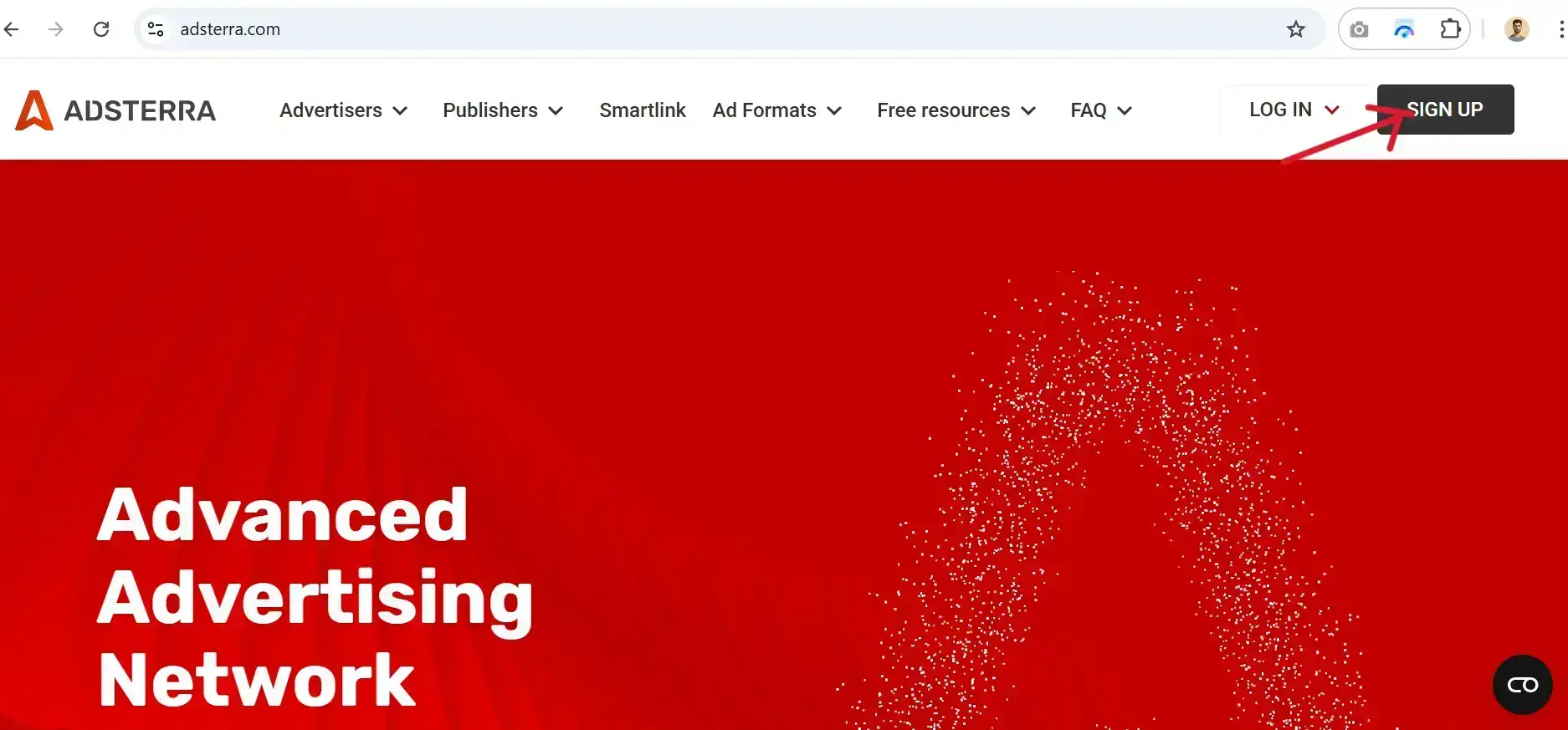
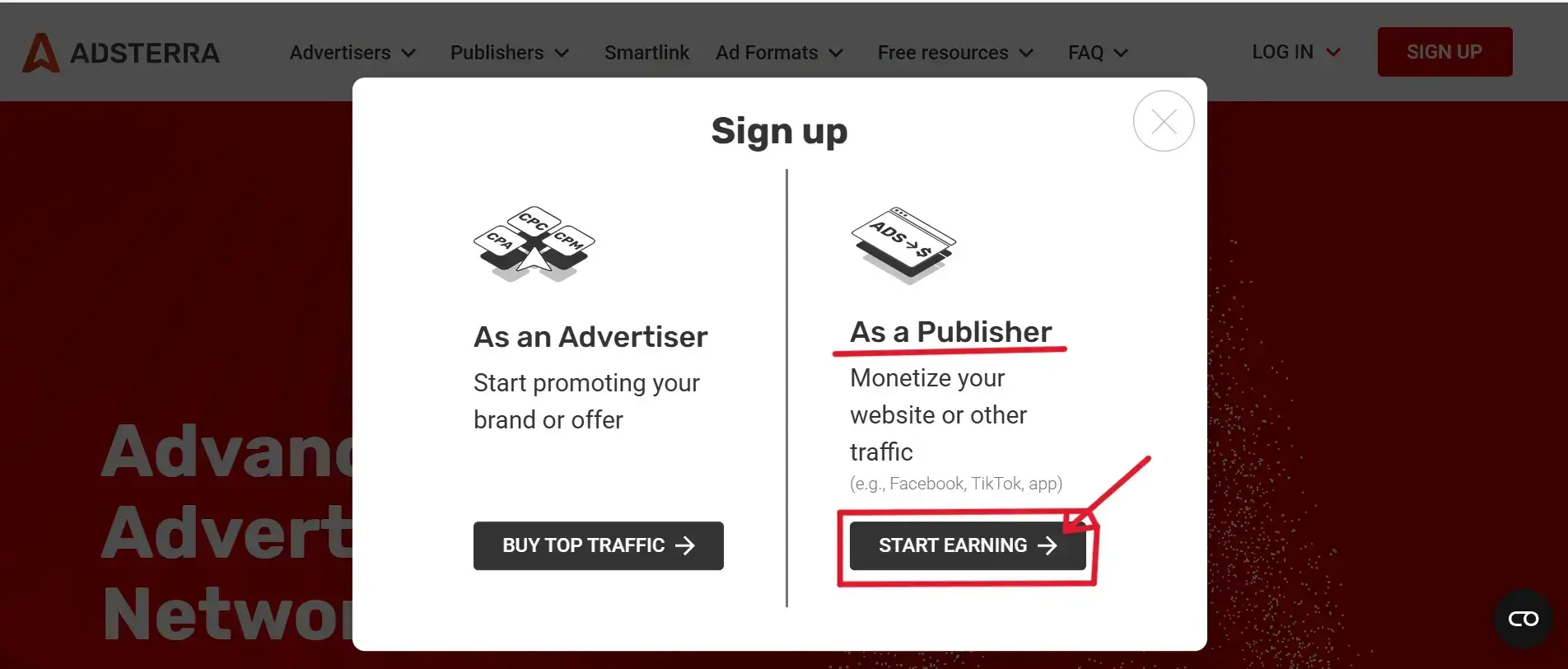
Go to the Adsterra website. Then click the “Sign Up” button at the top right corner. Then Choose “Register as a Publisher”.
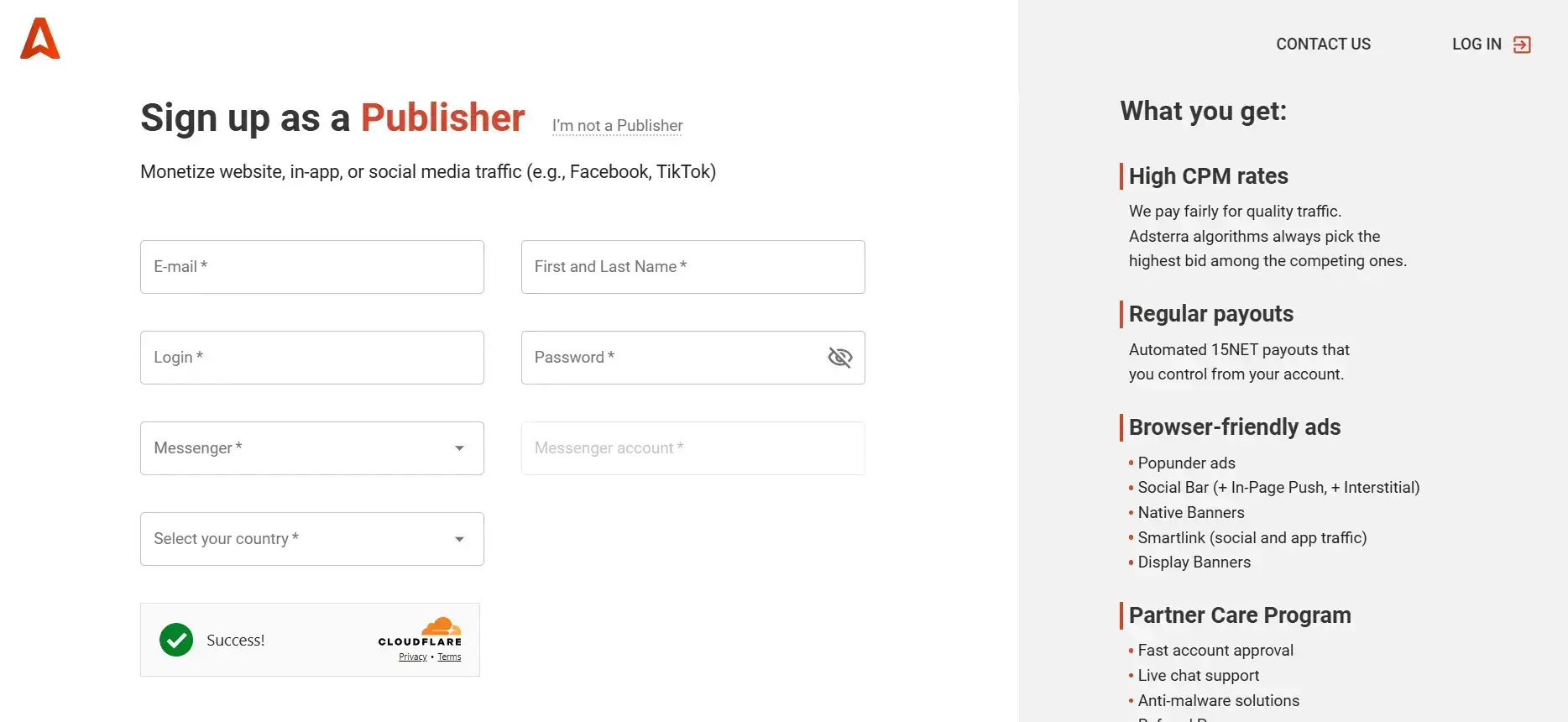
Step 2 – Submit Your Details
Fill in all the required information to complete the registration. After signing up, Adsterra will send a confirmation email. Then click the link in the email to confirm your account. Now you can log in to your Adsterra account.
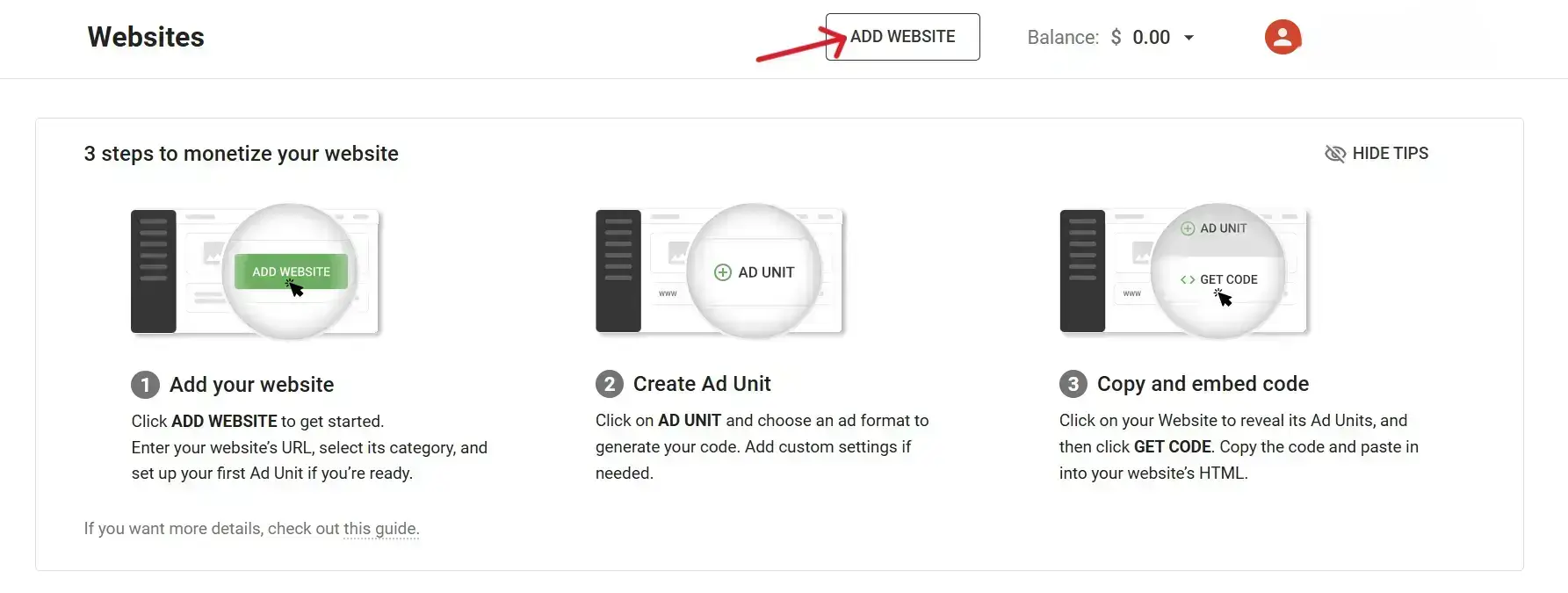
Step 3 – Add Your Website
Click on the “Add Website” button in your dashboard. A pop-up will appear:- Enter your website URL, select the website category, and choose the ad formats you want to use on your website. Then, Click Add. Your website will be sent for approval.
Step 4 – Get Your Website Verified
Go to the Websites page in your account. You will see the status of your website:
- Pending → waiting for approval
- Approved → website is verified and ready to show ads

Step 5 – Implement Ad Code
You’ll receive an email containing your Adsterra code script. Alternatively, you can access the code directly from your publisher account. On the left side of the screen, you’ll see instructions indicating where to insert the code.

Once you’ve inserted the Adsterra ad code into your website, that’s all you need to do. You can follow this simple process to add ads to multiple websites.
Note: You can also insert the Adsterra code script directly into your website’s blog posts using the WordPress plugin Ad Inserter – Ad Manager & AdSense Ads.
That’s it! Your website is now live with Adsterra ads. You can repeat the same steps to add multiple websites.
Sign Up as an Advertiser with Adsterra
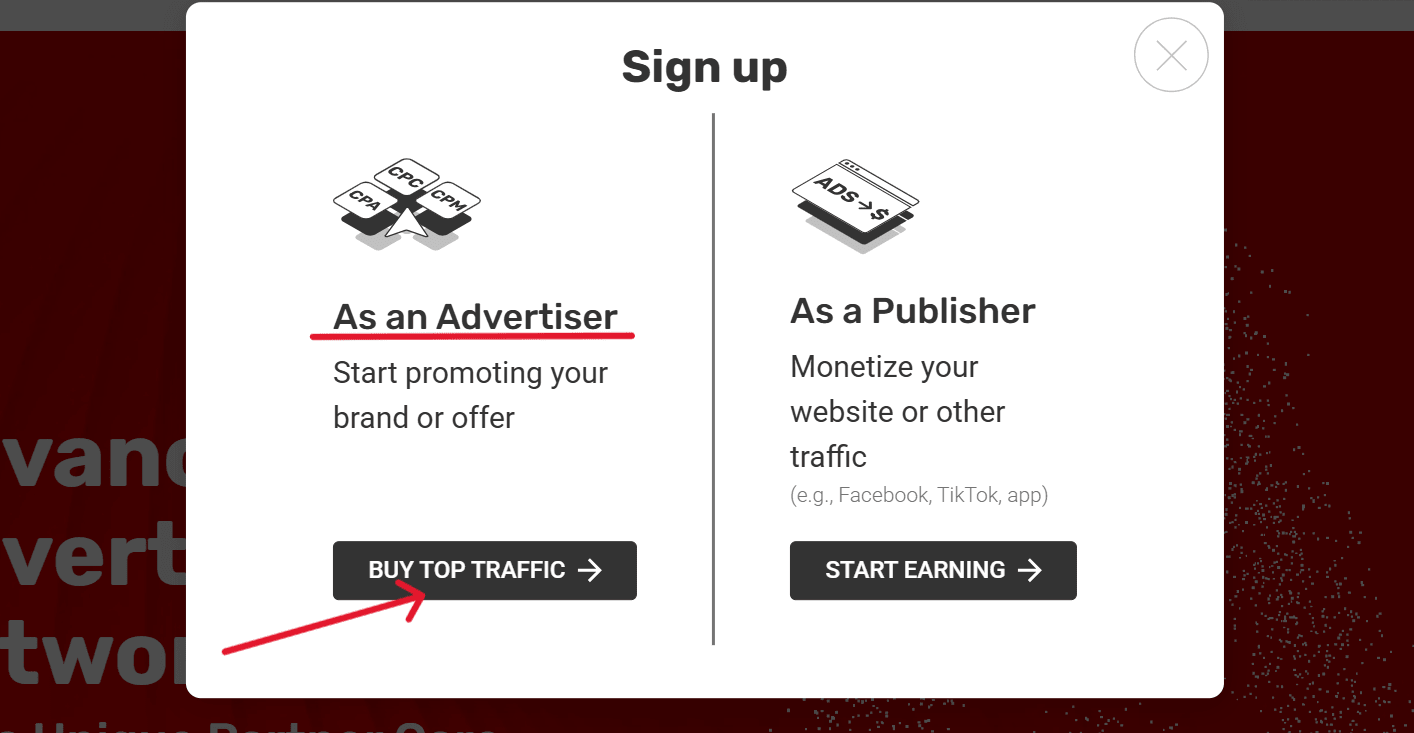
Step 1 – Sign Up as an Advertiser
Go to Adsterra website. Click the “Sign Up” button at the top right corner. Then choose “Register as an Advertiser”.
Step 2 – Submit Your Details
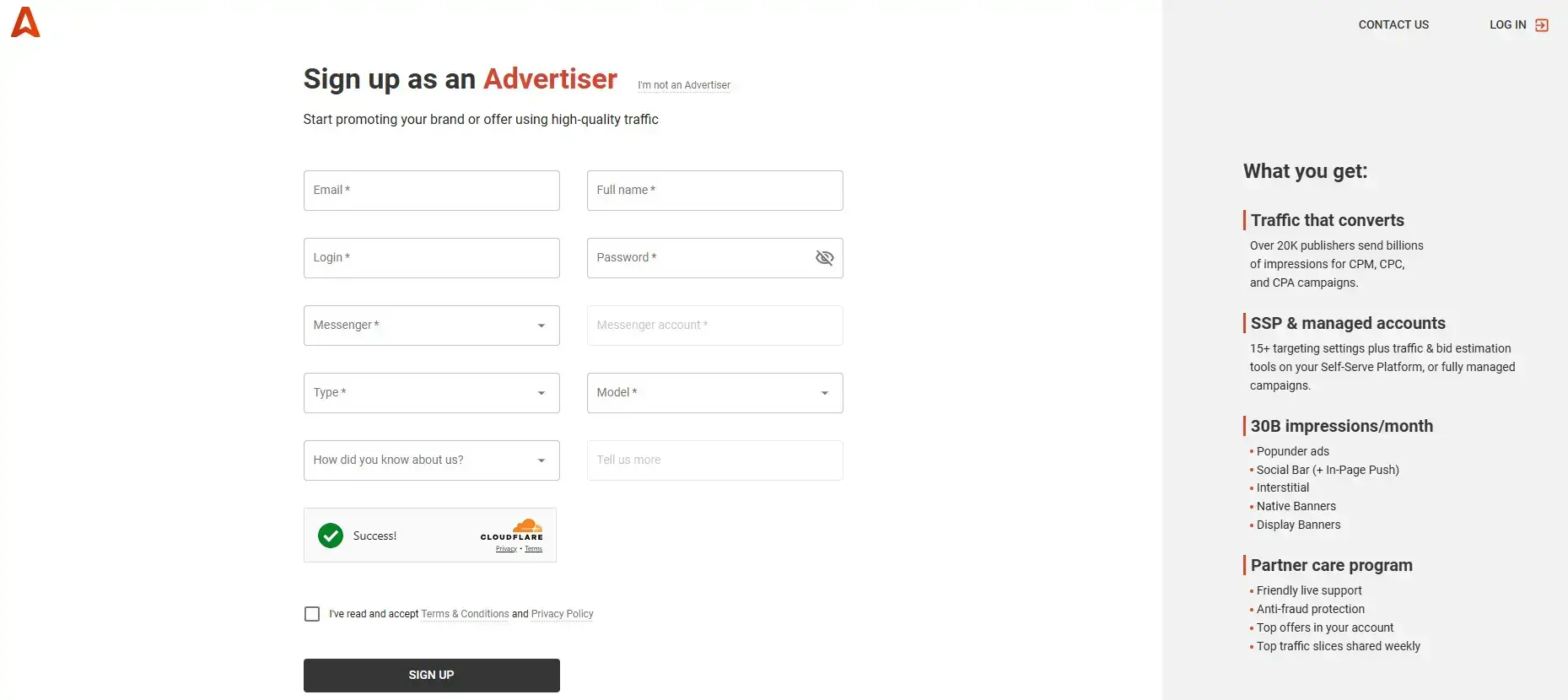
Fill in all the required information. After submitting, Adsterra will send a confirmation email. Open the email and confirm your account.
Step 3 – Log in to Your Account
Once your email is confirmed, log in to your advertiser account. You will see a step-by-step guide for creating campaigns inside your dashboard.
Step 4 – Add Funds to Your Account
Go to the “Finance” tab in the sidebar menu. Choose a payment method and top up your balance. Adsterra supports, Paxum, Wire Transfer, Visa / MasterCard / UnionPay and PayPal
Step 5 – Create Your Campaign
Click on “Create campaign”. Set all the campaign details according to your needs. Control performance by, Adjusting campaign settings, Adding a blacklist for low-performing placements, Pausing, restarting, or deactivating campaigns, Cloning campaigns for quick setup, Ensure postback tracking is working. You can also get help from an account manager if needed.
Step 6 – Configure Your Conversion Tracker
Adsterra supports a variety of integrated trackers, Voluum, Keitaro, Redtrack, Binom and Bemob. Choose whichever tracker is most convenient for you. Proper tracking helps optimize your campaign performance and conversions.
After completing these steps, your Adsterra advertiser account will be ready, and you can start running your campaigns effectively.
Adsterra Referral Program – Earn Extra Income

Adsterra isn’t just about showing ads, it also offers the opportunity to earn additional income through referrals. It works like this:
Share your personal referral link with friends, fellow bloggers, or on your website/social media. When someone signs up through your link and starts earning with Adsterra, you’ll receive 5% of their earnings for life.
Join the Adsterra referral program now: Referral link
My Experience with Adsterra
Friends, I’ve used Adsterra myself, and my experience has been really positive. One of my favorite things is how quickly new bloggers get approved, making it easy to start earning without delay. The ad formats are clean, simple, and easily integrated into any website, making the entire process extremely user-friendly. Payments are always received on time and without hassle, and their support team is reliable and helpful whenever you have questions. Overall, Adsterra is a great choice for bloggers and website owners who want to start earning online quickly.
Also Read: Meta Ray-Ban Display Smart Glasses: Price & Features 2025
Pros and Cons of Adsterra
I can’t finish this review without discussing the pros and cons of Adsterra. Here’s a simple breakdown:
Pros of Adsterra
- It is one of the best alternatives to Google AdSense.
- Easy to set up and start earning.
- Quick approvals and regular payouts.
- Supports both desktop and mobile ads, so you can earn from all types of traffic.
- Offers a wide range of ad formats, including Popunder, Social Bar (new!), In-Page Push Ads, Banner Ads, Native Ads and Interstitials.
- Works for both low and high traffic websites.
- You can also monetize popular Facebook or social media pages with high traffic using Smart Direct Link.
- Provides a variety of payment options with different minimum thresholds.
- Minimum payouts are low, starting at $5 (for Webmoney and Paxum).
- No restrictions on traffic volume – what matters is the quality of your traffic.
Cons of Adsterra
- Some payment methods require documentary confirmation.
- Currently, there is no demographic targeting for advertisers.
- CPM rates can vary depending on location and niche.
Conclusion
Friends, if you want to make money blogging but are having trouble getting AdSense approval, Adsterra is the perfect solution for you. It’s suitable for beginners, offers fast approval, and helps you start earning money from your blog or website immediately.
Don’t wait any longer – sign up today and start earning money from your website or blog immediately: Referral link